I gotta tell you, finding the right tool to make your WordPress site look amazing and work fast is a big deal for me. Especially for anyone who runs a news site, a magazine, or a big blog. You need something that handle all your content easily. That’s why we been spending time checking out the Latest PostX Pro plugin. It’s the one that gives you a ton of Gutenberg post blocks.
This postx plugin is more than just some blocks, though. It’s like a whole site makeover kit packed into one neat little package. The version we’re talking about, the PostX Pro v1.7.3, brings some serious features to the table. We’re going to walk through everything, from the awesome layouts to the stuff that helps your site visitors find content faster. We will also talk about the cool management tools this plugin bring, which makes content flow (you might even say postx logistics) much simpler for a team.
If you’re tired of your current theme not cutting it or just want to speed up your design work, keep reading. We got the full breakdown for you.
1. The Core: Gutenberg Post Blocks and Layouts
When you run a content site, the way you show your articles is everything. Nobody wants to see a long, boring list of links. The postx gutenberg post blocks let you organize your stuff so it looks super professional, like those big media websites.
The folks who built this tool gave us over 40 blocks. That’s a lot of ways to display posts! You can just drag-and-drop them right into your editor. If you don’t wanna spend time messing with settings, they got over 250 ready-made patterns. You just click one, and you’re good to go. It make things much simpler for everyone.
Types of PostX Blocks You Get
- Post Grid: This is the classic. It shows off your posts in neat squares or rectangles. The Latest PostX Pro has the most variations of these layouts.
- Post List: A clean vertical display, good for sidebars or mixing with other grid sections.
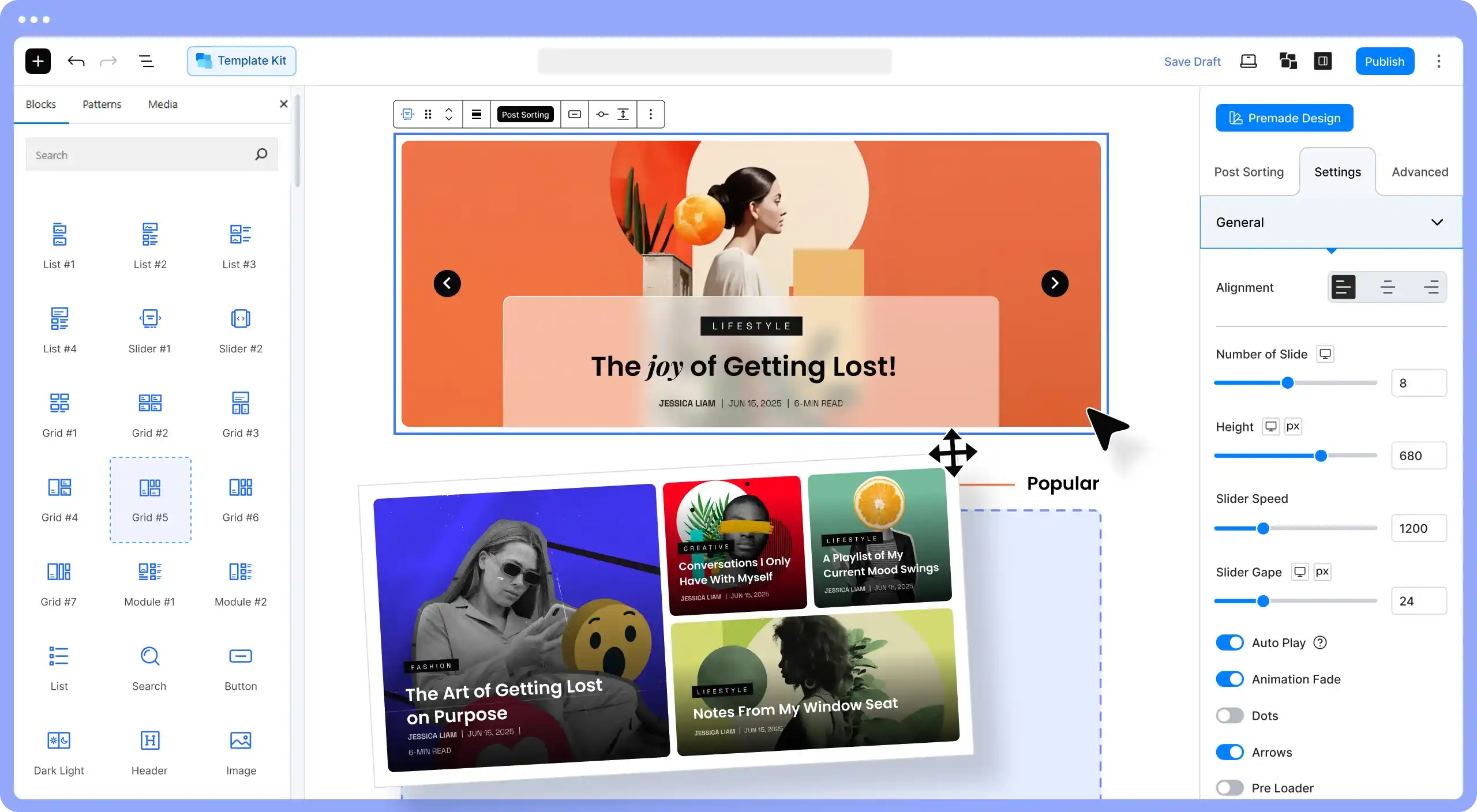
- Post Slider & Carousel: Awesome for putting important or new posts right at the top of a page. They move and grab people’s attention.
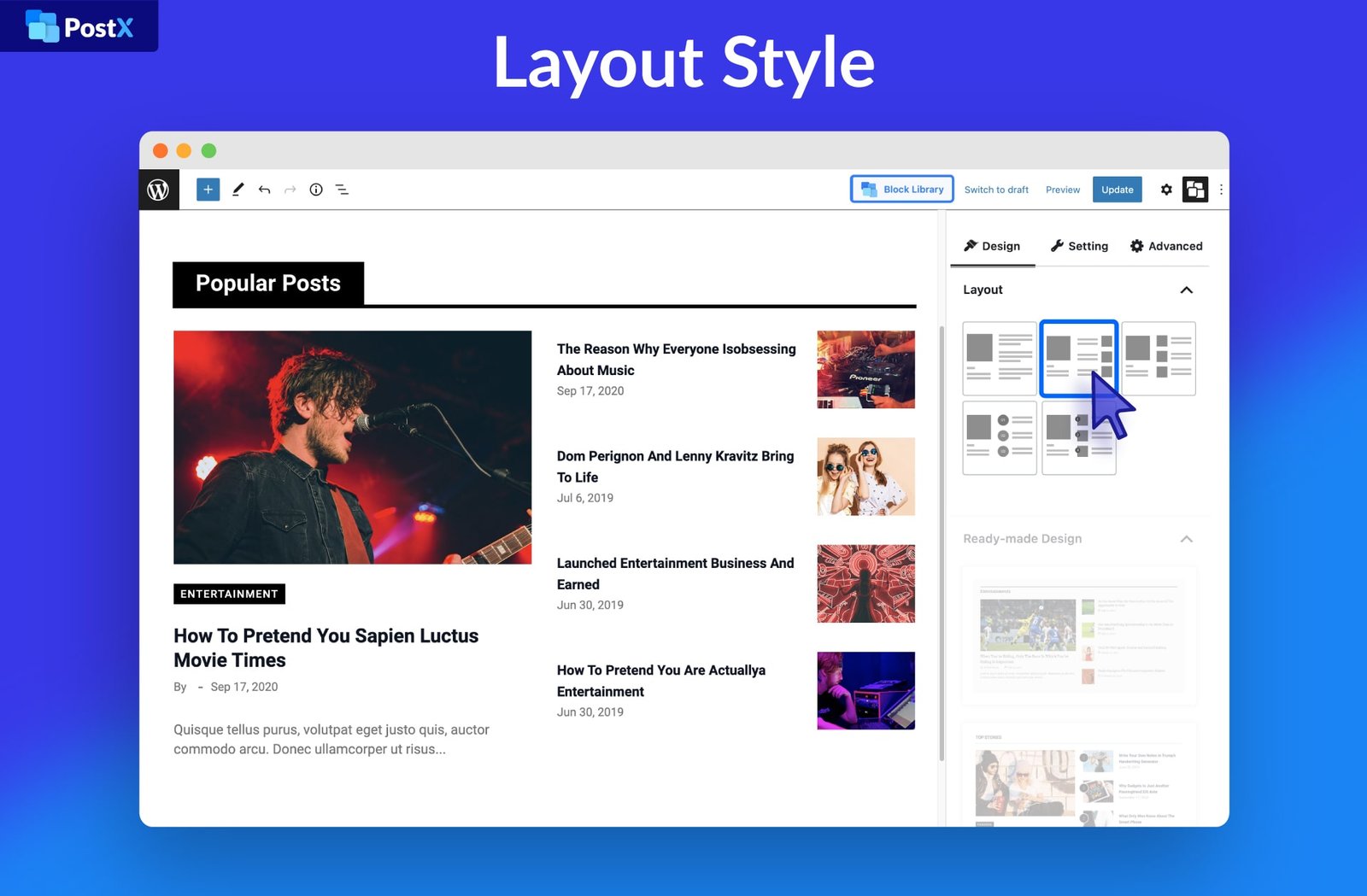
- Post Module: These are custom combinations of posts, maybe a big featured one next to several small ones. Real nice for a homepage.
When you are designing these pages, you might need to check how long your text is or clean up some formatting. That’s why we also have tools like our Word Counter and Text Cleaner & Remover available. Just a side note for anyone looking for that extra polish!
2. Build Sites Super Fast with Starter Sites
One of the coolest parts about the postx pro is the ready-to-use Starter Sites. Seriously, you can get a whole website up and running in just three steps. You don’t need to be a coding wizard or hire some expensive agency. You pick a template you like, change the colors and text to fit your brand, and boom—you’re live.
Starter Sites Are Available For:
- All kinds of News Websites
- Magazine Websites
- Sports and Tech News Sites
- Gaming and Crypto Sites
- Travel and Food Blogs
- And many more categories
If you’re running a big content site, you might be looking at other Magazine / Blog / News themes too, but PostX makes it so simple inside the Gutenberg editor that it’s tough to beat. Also, if you run a membership site, we got all kinds of great LMS and Security & Backup solutions reviewed over on the Plugins page.
3. Powering Up Your Content Flow with the Query Builder
Okay, this is where the PostX Pro gets really smart. The Query Builder is the brains behind what posts show up where. It allows you to create specific rules for every block. You want to show the four newest posts from your ‘Gadgets’ category that also have the ‘Review’ tag? No problem. The Query Builder handles all that complicated sorting for you.
How You Can Sort Your Content:
- Show posts based on a single Category or a mix of Categories and Tags.
- Display Custom Post Types—perfect if you run an eCommerce / WooCommerce shop or a directory.
- Sort by popularity (Most Commented Posts) or by time (Recent Posts, Oldest Posts).
- You can even Reorder Posts manually or Exclude Posts you don’t want to show.
- Find Related Posts automatically.
This kind of control over content distribution is what makes the postx wordpress plugin so good for managing your site’s content flow. It’s what we mean when we talk about powerful postx logistics—it’s all about getting the right content in front of the right person at the right time. For example, if you are working on a new Business / Corporate site, you will need tools to check your text, like our Keyword Density Checker, to make sure you are hitting your marks.
4. Making Site Visitors Happy: Ajax Search and Filters
Nothing is more annoying than clicking a filter and waiting for a page to reload. PostX Pro fixes this with its Ajax features. Ajax just means things load super fast without refreshing the whole page. This is a must-have for any modern, high-traffic website. It makes your site feel snappy and responsive.
The Speed Tools:
- Ajax Search Block: Users start typing, and results pop up instantly. They don’t gotta wait around. It’s a huge speed boost for finding content.
- Advanced Post Filter: Visitors can filter posts by Category, Tags, or even Author without the page blinking. It’s great for letting users dig deep into your archives.
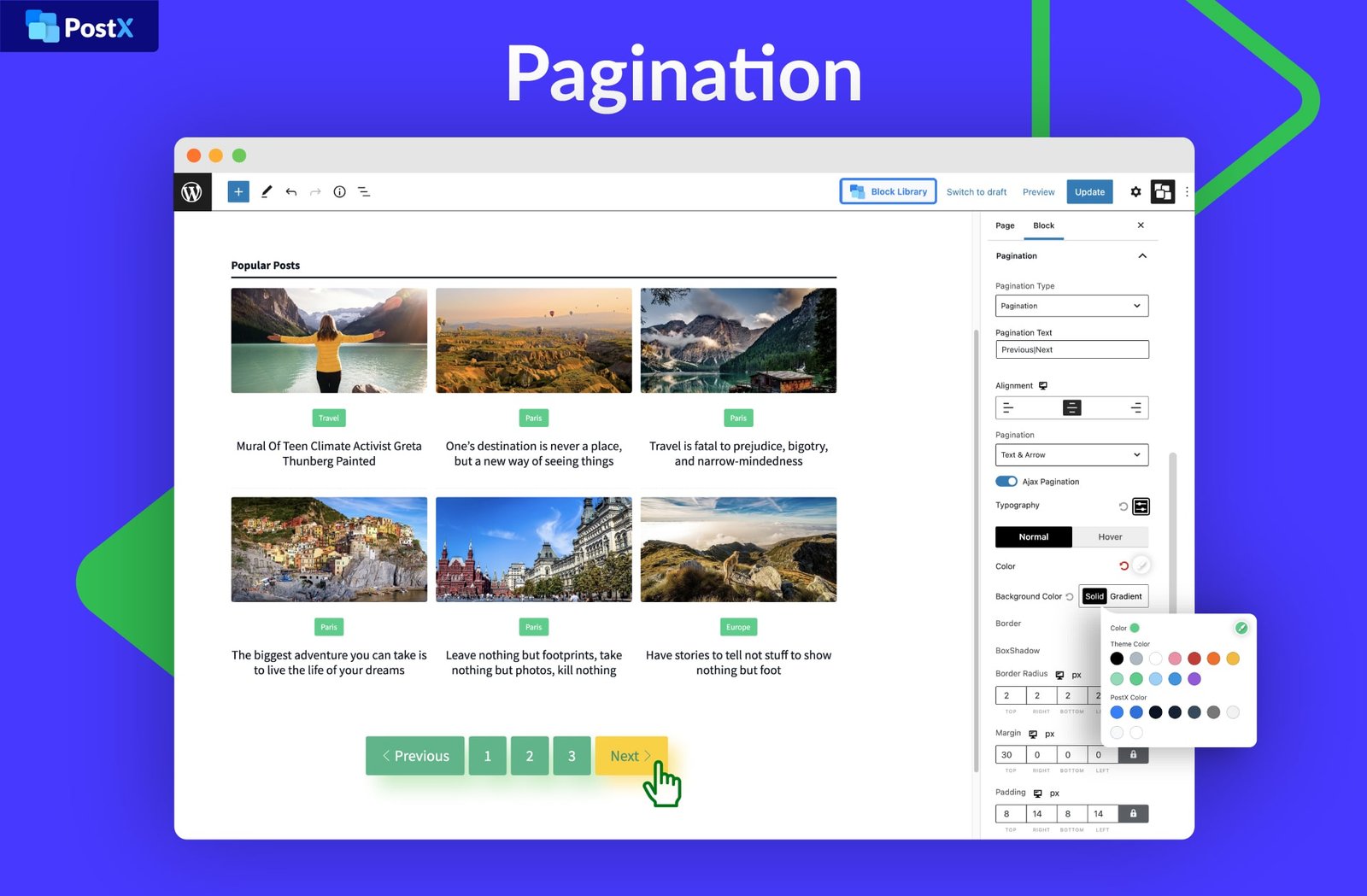
- Ajax Pagination: Instead of loading a brand new page, PostX can Load More posts right below the existing ones, or use smooth navigation buttons. It keeps users on the page longer.
Speaking of speed, if you are worried about your site speed, we got a whole section on Speed Optimization plugins. And if you have a ton of images, you should be using our Image Compressor or PDF Optimizer to cut down on file size before you upload them. Every little bit help, you know?
PostX Pro vs. Other Solutions
People often ask how PostX Pro stacks up against other, similar blocks plugins. While other tools offer basic grids, PostX goes further. Here’s a quick peek:
| Feature | PostX Pro | Competitor A (Basic Grid Plugin) | Competitor B (Page Builder Module) |
|---|---|---|---|
| Dynamic Site Builder (All Page Control) | Yes, complete control | No, only post content | Yes, but requires heavy Page Builder |
| Number of Ready Patterns | 250+ patterns | Less than 50 | Few, mostly requires manual design |
| True Ajax Search & Filters | Yes, built-in blocks | No, usually requires add-ons | Limited, sometimes slow |
| Front End Submission | Yes, with editor and correction notes | No | No |
5. Design and Integration: Going Beyond Posts
The postx gutenberg builder isn’t just for posts; it’s for your whole site. The Dynamic Gutenberg Site Builder lets you take over every single page template. You can customize the look of your Home Page, your Blog Posts, all your Archive Pages, Category Pages, Author Pages, and even the Search Results page. This level of control is why this is such a powerful postx wordpress tool.
Customizing the Look and Feel
- Global Styles: You can set color palettes and typography one time, and it overrides your theme’s style, so everything looks consistent. No more mismatched fonts!
- Custom Font: Got a special font? You can upload it and use it in all your PostX blocks. This is great for unique branding. We even got a Case Converter if you need to quickly change all your titles to uppercase!
- Taxonomy Image and Color: You can add special colors and featured images to your categories and tags. This make them look more like a post when they are displayed in a block.
Working with Other Tools
The developers knew that people use other tools, so they made sure PostX plays nice with everyone.
Page Builder Friendliness
If you already love your favorite page builder, you can still use PostX blocks and templates alongside them. It integrates with major builders like:
- Elementor
- Divi
- WPBakery
- Oxygen
- Bricks Builder
- Beaver
This is a big relief because you don’t have to switch everything all at once. If you’re building a new site using one of these, check out our Page Builder category for more plugin reviews.
SEO Tool Support
For search engine optimization, PostX is ready to go. It works smoothly with all the big SEO plugins. This is important because it let you replace the default WordPress excerpt with the custom meta description you wrote in your SEO tool, making your search results look better. It works great with:
- Yoast SEO
- Rank Math
- All-in-One SEO
- SEOPress
Remember that good SEO starts with good content. If you need help with text analysis, our Text & Writing Tools can assist. Also, if you’re collecting emails for marketing, we have great Email & Forms plugin reviews too.
6. Conclusion: Why the Latest PostX Pro is Worth Looking At
The Latest PostX Pro plugin is definitely one of the top choices right now for anyone running a content-heavy postx wordpress plugin site. It gives you the power of a page builder right in the Gutenberg editor, but it’s specifically focused on content display, which is awesome. The Ajax features are a huge win for site speed and visitor experience, and the Query Builder makes content management easy for even the most complicated website structure.
We at WP Toolkit Hub are always looking for tools that genuinely help our users succeed. If you run an eCommerce Add ons site or need some help with Multilingual / Translation options, PostX Pro’s ability to handle custom post types and its WPML compatibility make it a good fit.
If you’re looking for a simple way to take your blog from “okay” to “WOW,” the PostX Pro v1.7.3 is the tool that can do it. Whether you are using a Multipurpose / Page Builder-Based theme or a niche Directory / Listing / Coupon setup, the blocks here will fit right in. We even got an Invoice Generator and QR Code Generator for all your business needs! We hope this detailed look helps you make a choice. We believe in finding great All types of WordPress theme plugins that give you total control.
For those interested in the postx pro free download, you should look into the official developer site. We highly recommend supporting the developers who make such high-quality products. However, if you are just testing it out or need the basic version, the free one has many good features too. Thanks for reading. Let us know what you think!
P.S. Need to calculate something quick? Check out our Tip, Discount & GST Calculator tools!
Frequently Asked Questions About PostX Pro
What is PostX Pro for and why should I care?
PostX Pro is a postx gutenberg post blocks plugin for WordPress. It helps you design beautiful, fast-loading post grids, lists, and sliders without writing code. You should care because it makes your site look better and makes it easier for people to read your content, which is a big thing for SEO.
Does PostX Pro work with my current WordPress theme?
Yes, it’s designed to work fine with most modern themes. It even has a Global Styles option that let it override your theme’s settings if you want to use PostX’s styling everywhere. It is tested with all the big themes like Astra and Kadence.
Can I use PostX Pro blocks with Elementor or Divi?
Totally. The developers made sure you can use their blocks right inside your favorite page builder, like Elementor, Divi, or Beaver. It’s flexible, so you don’t gotta rebuild your whole site to use the good features.
How does the Ajax Search help my site visitors?
The Ajax Search block makes searching for content much faster. When a visitor type in a search term, the results pop up instantly, just like in Google. This improves the user experience a lot and keeps people from getting annoyed and leaving your site.
7. A Deeper Dive Into Design Flexibility and Customization
One of the true tests of a modern postx plugin is how much creative room it gives you. The Latest PostX Pro gives you total freedom over the small details. It’s not just about picking a layout; it’s about making that layout exactly what you need. Think about things like custom post metadata. You don’t just have to show the title and the date. You can add things like reading time, post view count, or even custom fields you’ve made with plugins like ACF.
The Dynamic Content feature is a game-changer for people running specialized websites. For instance, if you have a movie review site and use a custom field to rate the movie with stars, PostX Pro allows you to pull that data right into your post grid automatically. It makes the content look rich and informative, right from the main page.
This attention to detail also goes into the mobile experience. Since most people read content on their phones, the layouts need to look fantastic and adjust automatically. The blocks are built to be responsive from the start, so your magazine or news site always looks good, no matter the screen size. If you are developing a Portfolio / Creative / Agency website, having these flexible, responsive blocks is super important for showing off your work cleanly.
Content Management and Teamwork
Another area where PostX Pro shines is making content management easier for teams. The Front End Submission feature is fantastic for guest writers or content teams. They don’t have to navigate the confusing WordPress backend. They can submit their article from a simple, clean front-end dashboard.
Even better, the system allows editors to leave comments or correction notes, kind of like what you do in Google Docs, all without leaving the WordPress dashboard. This smooth process really helps with postx logistics and getting content approved and published fast. When you’re managing a big site, you need tools that save you steps, and this is definitely one of them. For larger sites, checking out our Marketing & Popups and Directory / Listing / Coupon sections can offer other great tools to keep your audience happy.
The Little Things That Add Up
Sometimes, it’s the small features that make the biggest difference in a postx wordpress plugin. PostX includes a Reading Progress Bar. You see this often on big media sites—it’s a little bar at the top of the screen that fills up as you scroll down the article, showing you how much is left to read. It’s a nice visual cue that encourage people to finish the article. You can put this progress bar on any page, not just the single post view.
Also, the Dark Light mode button is a great quality-of-life feature for your readers. Giving them the option to switch to a dark background is huge, especially for people who read a lot at night. It’s just a thoughtful thing to include. When you are making sure your site is up to snuff, consider using our Image Converter to prepare your graphics, or maybe our Password Generator & Strength Checker to keep your site safe.
For those who love organizing every little thing, the ability to add images and colors to your taxonomies (categories and tags) is really useful. It let you display those categories in your post blocks just like they were articles, making the navigation visually engaging. This feature, combined with the powerful Query Builder, gives you unmatched control over how your archive pages look. If you’re in the education space, managing your content flow is key, so you might be interested in our reviews of Education LMS-Focused Themes as well.
Ultimately, when you add up the speed, the design options, the content control, and the seamless integration with other tools, the Latest PostX Pro stands out as a top-tier solution. It delivers on its promise to be an ultimate solution for news, magazine, and blogging websites built with postx gutenberg post blocks. Its the right choice for anyone who takes their online content seriously and want a great-looking website without a huge amount of fuss. Don’t forget, we at WP Toolkit Hub got loads of reviews on the best WordPress theme and plugins, so check them out!
Disclaimer: This review covers the features of the PostX Pro v1.7.3 plugin. We encourage you to visit the developer’s official site for details on licensing and how to get the most postx pro free download features, if available.
Need more tools? Our Generator Tools like the Invoice Generator are always ready to help your business operations. Check out the rest of our Tools and Calculator Tools for everyday utility!