




Case Converter Tool
Transform your text into different case formats instantly
Case Converter Tool Change Your Text Case Instantly
Why Use Our Case Converter Tool?
- Fast and simple no extra software or downloads needed.
- Supports multiple text transformations like upper case converter, lower case converter, title case converter, and more.
- Perfect for documents, emails, blog posts, or social media content.
- Corrects text written with caps lock on by accident using the toggle feature.
- Helps keep your content consistent and readable.

How It Works
Using the Case Converter Tool is easy. Follow these steps:

Copy your text from any document or word processor.

Paste it into the text area on the Case Converter page.

Select the case option you need, such as convert to lower case or title case converter.

Click the button, and your text will be transformed instantly.

Copy the converted text back into your document or editor.
Features of Our Case Converter
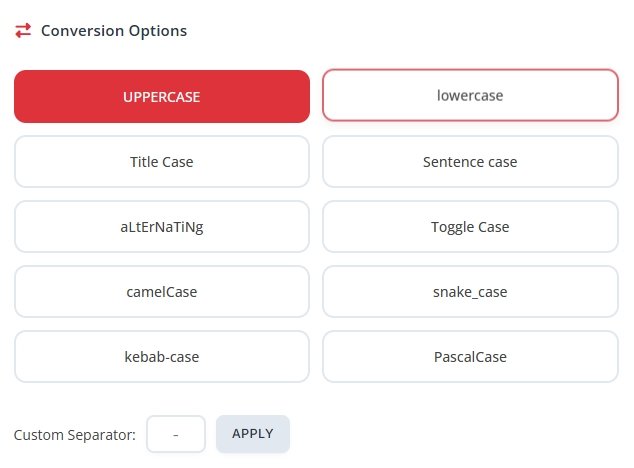
Lower Case Converter
The lower case converter changes all letters to small letters. It’s handy when you have text in upper case and want it normalized. For example, "HELLO WORLD" becomes "hello world". This feature also works well when you want to maintain a more casual tone in your text.
Upper Case Converter
The upper case converter converts all letters to capital letters. This is useful for titles, headings, or text that needs emphasis. For instance, "hello world" becomes "HELLO WORLD". It also works for acronyms and words that need full capitalization.
Sentence Case Converter
The sentence case converter capitalizes only the first letter of the first word in a sentence, keeping the rest lowercase. Proper nouns are also capitalized automatically. This style is perfect for emails, articles, or social media posts where sentences need to look natural.
Toggle Case
Have you accidentally typed with caps lock on? The toggle case feature flips the letters: uppercase letters become lowercase, and lowercase letters become uppercase. For example, "Hello World" becomes "hELLO wORLD". It’s quick, simple, and saves you from retyping text.
Alternate Case
The alternate case option changes letters in an alternating pattern of upper and lower case. For example, "hello world" becomes "hElLo wOrLd". This fun style can be used for social media, memes, or highlighting text in a playful way.
Title Case Converter
With the title case converter, the first letter of each major word is capitalized, making it ideal for headlines, article titles, or book names. Words like articles, conjunctions, and prepositions are usually left in lowercase unless they start the title. For example, "the quick brown fox" becomes "The Quick Brown Fox".
Other Useful Options
- camelCase Converts text to camel case style for programming or identifiers.
- PascalCase Capitalizes each word without spaces.
- snake_case Replaces spaces with underscores.
- kebab-case Replaces spaces with hyphens.
- Custom Separator Use your own character to separate words.
- Trim Text Removes extra spaces at the start and end.
- Reverse Text Reverses the letters in your text.
How to Convert Case Easily
Follow this simple guide to convert case quickly:
- Copy your text from a document or text editor.
- Open the Case Converter Tool in your browser.
- Paste your text into the input box.
- Select the case style you want, such as upper case to lower case converter, letter case converter, or convert to lower case.
- Click the button and wait a few seconds.
- Copy the output text and use it wherever you need.
Why Our Tool is Better Than Manual Editing
Most word processors only correct grammar automatically. If you need to change the case of a large portion of text, manual editing can take ages. Our case convert tool saves you time and effort. You don’t have to worry about missing a word or making new mistakes. Whether you need to convert uppercase to lower case or convert text case in a whole paragraph, it’s done instantly.
Who Can Benefit From This Tool?
- Students Quickly fix assignments and essays without worrying about capitalization errors.
- Writers Format titles, headings, or chapters in the style you want.
- Bloggers Make headlines look professional and consistent.
- SEO professionals Ensure keyword lists are formatted correctly using lower case converter or upper case converter.
- Social media managers Transform captions and posts with fun case options like alternate case or toggle case.
Additional Features
Our letter case converter includes helpful extras to make text management even easier:
- Clear all text Remove everything from the input area with one click.
- Copy all text Copy your transformed text quickly without manual selection.
- Word count and character count Keep track of text length for articles, posts, or SEO requirements.
Benefits of Using Our Case Converter
- Saves time by handling large blocks of text instantly.
- Reduces errors compared to manual editing.
- Multiple case styles in one tool: sentence case converter, title case converter, upper case to lower case, toggle case, and more.
- Fun options for social media like alternate case.
- Works for any kind of text: documents, emails, headings, tweets, slogans, and SEO content.
- No downloads or installations required accessible from any device.
Final Thoughts
The Case Converter Tool is the easiest way to manage text capitalization. From upper case to lower case or convert to lower case, to title case converter and fun options like toggle case or alternate case, it does everything fast. Save time, keep your text consistent, and make sure every document or headline looks the way you want. Try it today and see how simple text transformation can be.