




Text Cleaner & Duplicate Line Remover
WP Toolkit Hub has a tool to clean text and remove duplicate lines easily. It’s meant for anyone who works with text, lists, or documents. You can paste your content and get it cleaned in seconds without installing anything. It works in your browser, and everything is free.
Remove Duplicate Lines Online
Our Duplicate Line Remover makes it simple to remove repeated lines from any text. Just paste your text into the box, click the button, and all duplicate lines are deleted automatically. You can also choose to highlight duplicates before removing them if you want to see which lines are repeated. After cleaning, you can copy the text back to a file or download it directly.
This works even for long lists or big text files. You don’t need to worry about how many lines there are, the tool handles it fine. You can also sort lines alphabetically A-Z or Z-A after removing duplicates. There’s even an option to reverse the order if that’s what you need.
Why Use WP Toolkit Hub’s Tool?
Managing large text content can be annoying. Duplicate lines, extra spaces, or leftover HTML can make work slow. Our tool helps you:
- Save time by cleaning text in seconds.
- Keep data accurate by removing repeated lines.
- Prepare content for websites, emails, or documents.
- Use it for free directly in your browser without installing software.
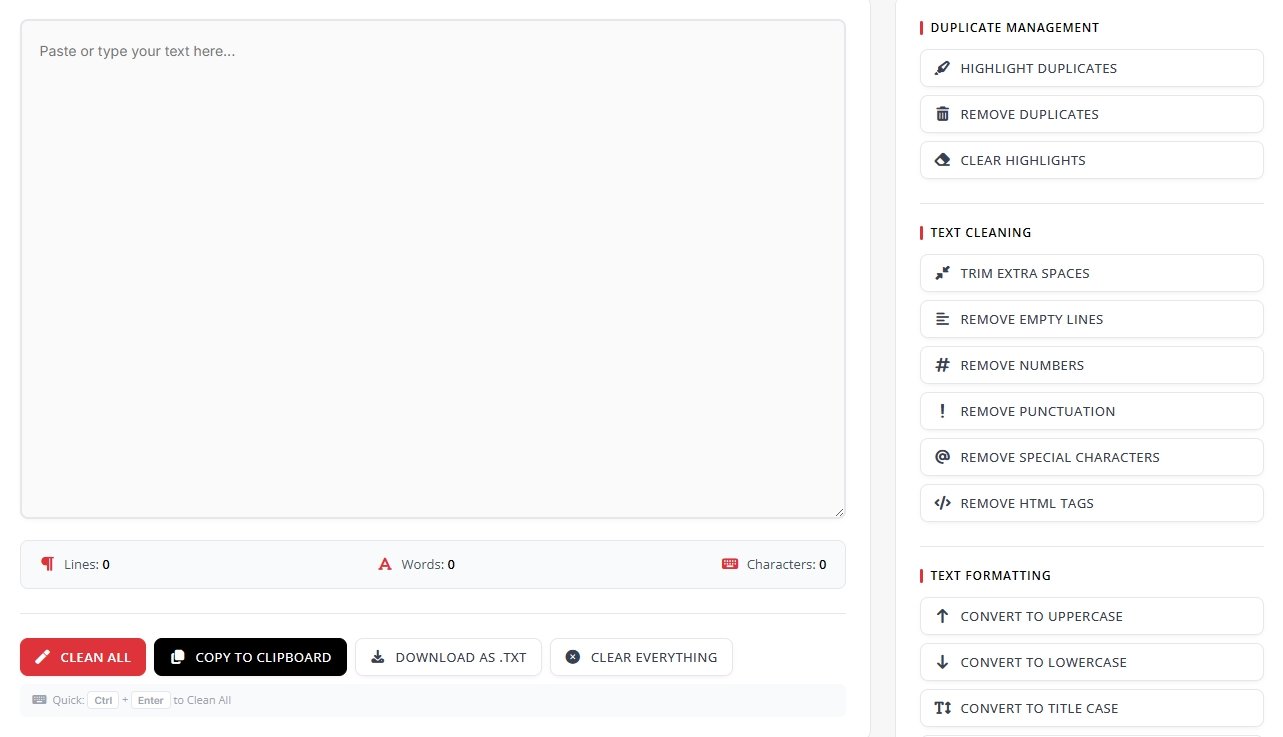
Duplicate Management Features
Highlight Duplicates
Marks repeated lines so you can see what will be removed.
Remove Duplicates
Deletes repeated lines from your text.
Clear Highlights
Removes the highlight if you just want to see clean text.
Text Cleaning Options
The Text Cleaner part of the tool has several options to make your text neat:
Trim Extra Spaces
Removes extra spaces at the start or end of lines so text looks clean.
Remove Empty Lines
Deletes blank lines that are not needed.
Remove Numbers
Deletes all numbers from your text if you don’t need them.
Remove Punctuation
Deletes punctuation like commas, periods, and semicolons.
Remove Special Characters
Removes symbols like @, #, $, %, etc.
Remove HTML Tags
Cleans any HTML code that comes from copied web content.
Text Formatting Features
Convert to UPPERCASE
Makes all letters capital.
Convert to lowercase
Makes all letters small.
Convert to Title Case
Capitalizes the first letter of each word.
Sort Lines A-Z
Orders your lines alphabetically from A to Z.
Sort Lines Z-A
Orders lines from Z to A.
Reverse Line Order
Shows the last line first and the first line last.
Counting Features
Line Count
Number of lines in your text.
Word Count
Total words in your content.
Character Count
Total characters including spaces.
Extra Buttons and Shortcuts
Clean All
Removes duplicates and cleans text in one click.
Copy to Clipboard
Lets you copy cleaned text without saving a file first.
Download as .txt
Save your text as a text file for later use.
Clear Everything
Resets the text box for new text.
Quick Clean (Ctrl + Enter)
Clean all text with a shortcut key.
How to Remove Duplicate Lines
Using the online duplicate line remover is easy:
Paste your text in the box.
Choose options like highlight duplicates, sort lines, or ignore case.
Click the Clean button.
Copy the cleaned text or download it as a file.
You can also use advanced options like ignoring capital letters so “Apple” and “apple” are treated as duplicates. There’s an option to keep blank spaces at the start of lines if formatting matters.
Compare With Other Tools
| Feature | WP Toolkit Hub | Other Tools |
|---|---|---|
| Remove Duplicate Lines | Yes, fast and easy | Some need login or limits |
| Text Cleaning Options | Trim spaces, remove numbers, punctuation, special characters, HTML tags | Usually only basic cleaning |
| Sorting Lines | A-Z, Z-A, reverse | Limited options |
| Count Lines, Words, Characters | Yes, automatically updates | Not always available |
| Quick Actions | Copy, download, clear, quick clean | Few tools have this |
Other Tools You Might Like
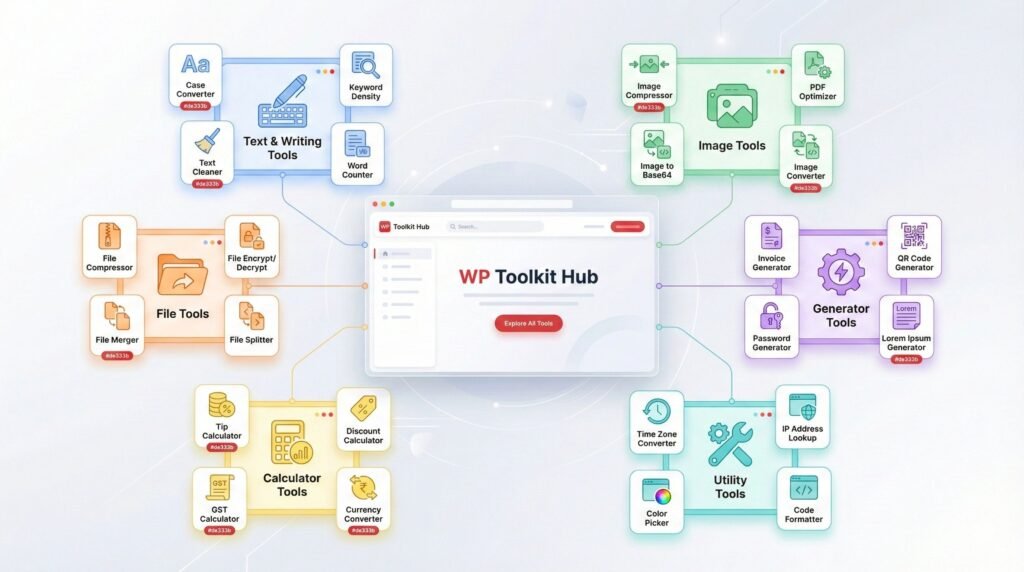
While working on text, you can also check out these other tools from WP Toolkit Hub:
Tips for Best Results
- If you have a huge text file, break it into parts to make cleaning faster.
- Check the cleaned text to make sure nothing important is removed.
- Use sorting options to make text easy to read after cleaning.
- Save cleaned text in a safe place for future use.
Privacy & Security
Supported Languages
Our tool works with text in multiple languages for duplicate removal, including English, German (Doppelte Zeilen entfernen), French (Supprimer les lignes dupliquées), and Spanish (Eliminar líneas duplicadas).
Final Thoughts
WP Toolkit Hub’s Text Cleaner and Duplicate Line Remover makes it easy to clean and organize text. It’s free, works in your browser, and handles everything from small notes to big lists. You can remove duplicates, clean extra spaces, remove numbers or HTML tags, format text, count words or lines, and download your text in one click. Try it now to make your text neat and easy to manage.